Home / Blog / Physician Number NPI: Why Totals Differ from Active Doctors
Physician Number NPI: Why Totals Differ from Active Doctors
ProfessionLens, 2026-11-13
The most repeated advice about a physician number NPI is simple: look it up in the federal registry, and if a clean record comes back, you've confirmed the doctor. That advice is half right, and the wrong half is where workforce estimates fall apart.
A registry hit confirms an identifier exists and that someone is enumerated as an individual provider. It doesn't confirm a current licence, an active practice, or a payer relationship. Analysts who count registry rows and call the result "the number of doctors" publish a total that no state medical board would recognize as a headcount.
The gap between enumeration and practice is measurable, and closing it takes a specific set of filters applied in a specific order.
Table of Contents
- What a Physician NPI Identifies and What It Does Not
- How to Look Up a Physician's NPI Number
- How the NPPES Registry Stores Each Physician Record
- Why NPI Totals Differ from Practicing Physician Counts
- Filters That Turn an NPI Total into Active Physicians
- Verify Physician NPI Records Before You Count Them
What a Physician NPI Identifies and What It Does Not
A physician number NPI is the National Provider Identifier, a 10-digit number that identifies a health care provider in electronic administrative transactions such as claims, eligibility checks, and payment. It isn't a licence number, a DEA registration, or an employee badge. It's the handle that ties a provider to a transaction.
The handle exists because of a deliberate federal decision. The U.S. Department of Health and Human Services issued the NPI final rule on 23 January 2004, establishing the NPI as the standard unique identifier for covered health care providers, as documented in the CMS NPI final rule. Providers could begin applying on 23 May 2005, and covered entities had a broader compliance deadline of 23 May 2007. Individual providers such as physicians fall under the rule, and so do organizations such as hospitals and medical groups. CMS administers the National Plan and Provider Enumeration System, NPPES, which assigns each number and holds the record behind it.

The registration plate problem
Think of the number the way you'd think about a vehicle registration plate. The plate tells you which vehicle is on record and who filed the paperwork. It doesn't tell you whether the car is parked, insured, roadworthy, or driven to work every morning. An NPI works the same way: it says an identity exists on file.
The final rule says this directly. An NPI identifies the provider but does not indicate licensure, specialty certification, payer enrollment, or whether a clinician is actively practicing. The number can be entirely valid on a record belonging to a physician who retired two years ago, moved to another state, or never billed a single claim.
Keep this in view: an NPI count is an enumeration count. It isn't automatically a count of currently licensed or clinically active physicians.
That distinction is the whole ballgame. Carry it into every total you read, including the totals on your own spreadsheets, and you'll spot most bad workforce numbers before anyone else in the room does.
How to Look Up a Physician's NPI Number
The lookup itself is easy. The interpretation is where people go wrong, because a registry result shows several fields and only a couple of them matter for identity.
Search wide, then narrow
- Search by last name, first name, state, and specialty where you know them. Enter only the fields you're certain about. A common surname with a broad state filter returns pages of results, and scrolling through them wastes more time than a tighter first search.
- Keep the individual results. Every record carries an entity type that separates individuals from organizations. A practice name that matches your physician's name is usually the practice, not the person.
- Open each candidate and read three fields. The 10-digit NPI, the primary taxonomy, and the practice address. The taxonomy is the specialty code, and the primary one decides how the physician is classified, because a clinician can hold several codes at once.
- Compare the taxonomy with the specialty you expected. If you searched for a cardiologist and the primary code points to a different field, you've either found the wrong person or found a physician whose record hasn't been updated since training.
- Check the deactivation field before you rely on the number. A number that shows as deactivated isn't a usable identifier for a current claim or a current count.
- Confirm the licence with the state medical board. This is the step people skip, and it's the only one that speaks to whether the person may legally practice today.
Treat a registry hit as proof of identity. It isn't proof of practice at the address listed, and it isn't proof that the clinician saw a patient this month.
If you're looking up your own number rather than someone else's, don't trust memory. Pull it from a claim form, a payer letter, or your practice's billing record, then compare that against the registry entry. A single transposed digit is enough to get a claim bounced before anyone reviews it.
A student who has just matched into residency should pay attention to taxonomy too. A record that still carries a student code looks fine on a search result and wrong on a credentialing file, and fixing it takes one update rather than a phone campaign.
How the NPPES Registry Stores Each Physician Record
The registry you just searched is only half the public system. The other half is a set of downloadable files, and CMS made publicly disclosable NPPES data available beginning in September 2007, which turned a lookup tool into a national administrative dataset for studying physician populations, per CMS data dissemination guidance.
Those two halves answer different questions. The free search service handles one provider at a time and refreshes frequently. The files handle everyone at once.
What sits inside a single row
Each provider occupies one CSV row, and CMS is explicit that the files include both active and deactivated NPI records. That single fact explains most inflated counts. A file that holds retired and dissolved records is a historical register, not a live roster.
The download infrastructure itself has changed shape. CMS moved from monthly full-replacement files to weekly incremental files, which let researchers track additions, updates, and deactivations far more often than the old cadence allowed. If your pipeline still assumes a monthly refresh, you're working from a snapshot somebody else has already moved past.
- Entity type splits the population into individuals and organizations. Physicians generally land in the individual group; hospitals and physician groups land in the organizational group.
- Taxonomy is chosen by the provider at application and can be revised later, which is why CMS tells physicians to move off a student taxonomy once they hold an allopathic or osteopathic licence.
- Reference files carry the repeated information: additional organization names, non-primary practice locations, and endpoints. The main provider file doesn't repeat those and shouldn't be read as if it did.
CMS also ships a header file and code-value documentation, and recommends importing everything into a relational database or processing it with someone who has the technical background for it. That's practical advice, not gatekeeping: the layouts are wide, the code values are numeric, and a column read one position off will invert your results.
The count that comes out depends on which file you opened. A NPPES full replacement file for September 2026 and a CMS Doctors and Clinicians national file released on 10 September 2026 describe overlapping but differently constructed populations, which is why ProfessionLens documents the source and count date behind each figure rather than blending them. The same enumeration versus practice gap shows up across professions, which is why a dental counting system faces an identical design choice between registry rows and licensed practice.
The two checks every record needs
Before any record enters a count, confirm its entity type and read its deactivation field. Skip the first and hospitals become doctors. Skip the second and the retired stay employed forever.
Why NPI Totals Differ from Practicing Physician Counts
Two totals can both be accurate and still disagree, because they answer different questions. Call them the enumeration question and the practice question, and keep them apart in your head.
Here's the enumeration side, counted from the NPPES provider file:
| Provider type | NPPES records | Count date |
|---|---|---|
| Physicians | 1,272,256 | 15 September 2026 |
| Nurse practitioners | 530,577 | 15 September 2026 |
| Pharmacists | 328,832 | 15 September 2026 |
| Dentists | 275,976 | 15 September 2026 |
| Combined total of the four groups | 2,407,641 | 15 September 2026 |
Now set that against a different list built for a different purpose. A count of physicians on the CMS Doctors and Clinicians national file comes to 730,327, dated 15 September 2026. Neither number is wrong. One counts identifiers in an enumeration system, the other counts clinicians attached to a claims-derived file, and the inclusion rules do the rest of the work.
A third list answers a third question. CMS publishes the Medicare Physician & Other Practitioners by Provider dataset, updated annually, with 2024 as the latest available year. That dataset describes utilization and payment for clinicians who bill Medicare. It says nothing about a physician who sees only cash-pay patients or works purely in an administrative role.
Three errors a raw count makes
- One person, many addresses. A physician with several practice locations appears once in the main file and again through location rows. Count rows and you've hired the same doctor three times.
- One person, several specialties. Multiple taxonomy codes mean a careless count files a physician under the wrong specialty, or under two. The primary taxonomy flag settles it.
- One person, one dead record. Deactivated and retired records persist in the historical file and still read like live clinicians at a glance.
Analogy worth keeping: a phone book lists names. Counting entries isn't the same as counting the people who answer the phone.
The decision rule is short. Identity questions go to NPPES. Medicare-linked and payment questions go to the CMS files. Questions about the active licensed workforce need the state licence roll joined to NPPES, which is the only pairing that speaks to who may practice today. Researchers comparing professions face the same split between licensed healthcare professionals and enumerated ones, and the same discipline applies: define the population before you quote a number.
Filters That Turn an NPI Total into Active Physicians
A raw total becomes a defensible one through filters, and each filter has its own source and its own question behind it. Applied in the wrong order, they'll produce a number that looks precise and means nothing.
| Filter | What It Removes | How to Check |
|---|---|---|
| Deactivation status | Records retired after death or business dissolution | Read the deactivation fields in the NPPES file |
| Entity Type Code | Organizations such as hospitals and medical groups | Keep Entity Type Code 1 for individuals |
| Taxonomy | Records whose primary specialty is not physician or is a student code | Use the primary taxonomy flag |
| Duplicate NPIs | Repeated rows for the same person | Deduplicate by NPI |
| Practice location | Extra addresses counted as separate doctors | Count one primary location per NPI |
| State licence | Lapsed or unlicensed physicians | Match against the state licence roll |
| Payer enrollment | Physicians with no payer or Medicare participation | Match against CMS enrollment or claims data |
Order matters more than the list
Start with entity type and deactivation status, because those two remove the largest blocks of noise with the least ambiguity. An organizational record isn't a physician on any reading, and a deactivated record isn't a usable identifier. Neither judgment needs a second source.
Then deduplicate by NPI. This has to happen before any licensing match, since a licence roll joined to duplicated rows produces duplicated matches that look like real coverage.
Taxonomy comes next, because specialty estimates built without the primary flag split one physician across codes. Practice location fits here too: one primary location per NPI keeps address rows from inflating the count.
Licensing and payer enrollment come last, and they're the expensive steps. Both require an external match, both need cleaning first, and both change the question from "who is enumerated" to "who may practice" and "who gets paid."
The habit that saves you: write the question down before you choose the filters. "How many physicians are enumerated in Texas" and "how many licensed physicians practice in Texas" need different pipelines, and only one of them survives a fact-check.
That difference is visible the moment you build a geographic comparison, which is why any serious table of physicians per capita by state has to pick a population and stick to it. A count is only as good as the filters that produced it, and a filter list with no stated order is a recipe for a number nobody can reproduce.
Verify Physician NPI Records Before You Count Them
A count that looked clean on the way in can fall apart on the way out. The verification pass is where that gets decided, and each step below pairs its reason with the slip that most often undoes it.
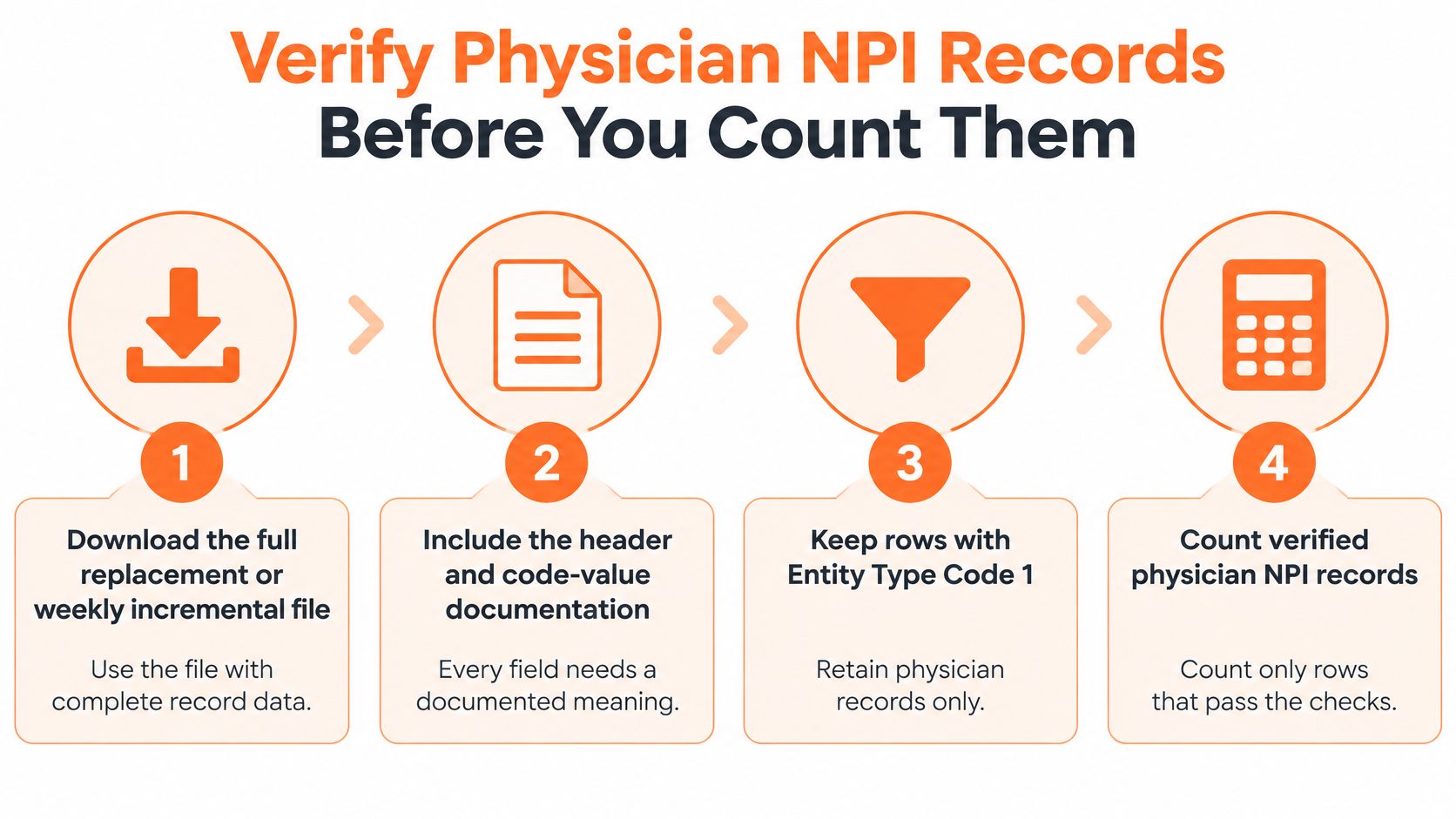
- Download the file with its header and code-value documentation. NPPES data are built for bulk processing, not page scraping, and each enumerated or deactivated NPI occupies one CSV row with a 10-digit NPI and an Entity Type Code, per the CMS NPPES data files page. The common slip is trusting a field name from an old tutorial that no longer matches the current layout.
- Keep Entity Type Code 1 rows. This is the individual filter. Leave it out and hospitals and medical groups enter your physician count as if they were clinicians.
- Flag every row with a deactivation date. Historical NPIs aren't always usable, and this is the field most often left unread because it sits at the end of a wide layout.
- Deduplicate by NPI. One physician, one row. Anything else is a counting error you'll have to explain later.
- Keep the primary taxonomy flag and drop non-primary practice location rows. The file design separates one-to-many information into reference files for additional organization names, non-primary practice locations, and endpoints. Counting those extra location rows as separate physicians overstates the workforce every time.
- Match the survivors against state licence rolls. Clean the roll first, because licensing files carry their own errors, duplicates, and lapsed licences, and a sloppy match imports all three. ProfessionLens computes its counts from public licensing rolls and federal files as pulled on the count date, and treats roll quality as a known limitation rather than a rounding detail.
- Match CMS enrollment or claims data where payer participation matters. An NPI carries no enrollment status, so this is the only way to answer a payer question.
Record-keeping rule: every published count should state its source, its count date, and how many rows were read, kept, and dropped at each step. That's the difference between a figure a reader can check and a figure they have to trust.
Verification also has a boundary worth naming. The steps above prove that a row is an individual physician with an active identifier and, after the matches, a licence and payer enrollment behind it. They say nothing about whether that physician's credentials will satisfy a payer's own review, which is a separate process: what credentialing verification actually covers lays out the documents that review examines. A clean NPI count is the starting point of that conversation, and treating it as the end of one is the last slip on the list.
ProfessionLens publishes physician counts built from the NPPES provider file and the CMS Doctors and Clinicians file, with a count date on every page and a method note that records rows read, retained, and dropped. The pages report counts by profession, state, county and employer, with no individual names attached. If you need a defensible figure for a story, a market model, or a planning deck, start with those count pages and the downloadable lists behind them. Visit ProfessionLens to check the sources and count dates yourself.