Home / Blog / CSV Examples for Workforce Research: 8 Public Datasets
CSV Examples for Workforce Research: 8 Public Datasets
ProfessionLens, 2026-10-29
In a December 2013 review of GOV.UK transparency files, the UK government reported 7,422 CSV files alongside 17,062 Excel files. CSV was the smaller share. It was still favored for open data because users didn't need proprietary software and machines could process it directly.
That preference explains the trap in workforce research. A file opens cleanly. The count still answers the wrong question. One source counts registrations, another counts Medicare enrollments, another counts billing clinicians, and another estimates employed people from a survey. Each produces a different headcount for what looks like the same profession.
These eight CSV examples show the distinction at column level. For each file, you'll see what a row represents, which fields drive the count, and the mistake that most often distorts it. Before you aggregate anything, apply practical methods for cleaning research data and write down what you removed. A reproducible count starts with that record, not with the final total.
Table of Contents
- 1. NPPES NPI Registry Downloadable File
- 2. CMS Doctors and Clinicians National Downloadable File
- 3. BLS Occupational Employment and Wage Statistics (OEWS) CSV
- 4. U.S. Census Bureau American Community Survey Tables (CSV)
- 5. County Business Patterns (CBP) CSV
- 6. HRSA Area Health Resources File (AHRF)
- 7. NCES IPEDS Completions Data (CSV)
- 8. CMS Medicare Physician & Other Practitioners by Provider and Service (CSV)
- Public CSV sources for workforce counts at a glance
- Choosing the Right CSV Before You Count
1. NPPES NPI Registry Downloadable File

The National Plan and Provider Enumeration System, or NPPES, is distributed by CMS as a zipped CSV with a data dictionary. A row is an NPI record, not proof that a person is currently practicing. That distinction governs every count you take from it.
Say you want active physicians by state. Filter on entity type for individuals, select the relevant taxonomy codes, and use the practice location state, not the mailing state. Then separate deactivated NPIs from active ones. If you skip that step, retired and duplicate registrations inflate your total.
How to keep the count auditable
- Confirm fields first: Use the data dictionary to verify taxonomy and entity type before filtering.
- Parse in chunks: Don't load the full extract into memory. Use a columnar tool or read the file in pieces.
- Record the funnel: Document rows read, retained, and dropped, plus the release date.
Matching practice addresses to county FIPS codes produces county clinician counts, but only if you handle multiple practice locations explicitly. For context on how this file compares with other registries, see this overview of licensed professional data sources. NPPES tells you who's enumerated. It doesn't tell you who's employed, full time, or seeing patients this month.
2. CMS Doctors and Clinicians National Downloadable File
Start with a different question here. This CMS file lists clinicians enrolled in Medicare, with specialty, practice location, and group affiliations. It replaced Physician Compare as the main federal link between individual clinicians and organizations.
A clinician who works at three sites can appear in multiple rows. Count rows and you'll count locations. Count unique clinician identifiers and you'll count people. Those are different findings, and your table heading must say which one you've published.
Practical rule: Deduplicate by clinician identifier for a headcount. Count rows only when you're reporting practice locations or affiliations.
Say you rank health systems by affiliated physicians in one state. Group by organization, deduplicate clinicians within each group, and cross-reference NPIs against NPPES to confirm they're valid. Then label every table with the file release month.
The common distortion is quiet. A Medicare-enrolled count gets cited as a total licensed count. It isn't. Clinicians who don't enroll in Medicare, including many who serve pediatric or cash-pay populations, won't appear. State that boundary in the same paragraph as the number, not in a footnote readers will miss when they quote you.
3. BLS Occupational Employment and Wage Statistics (OEWS) CSV

OEWS doesn't count licenses at all. The Bureau of Labor Statistics publishes survey-based estimates of employment and wages by occupation, using SOC codes, for national, state, metropolitan, and nonmetropolitan areas. A cell is an estimate. It's not a registry total.
That makes OEWS a benchmark, not a substitute. Compare registered nurse employment across metropolitan areas here, then place it beside a licensed count from a state roll. If the licensed figure is much higher, that gap may reflect inactive licenses, part-time work, or people licensed in a state where they don't work. It doesn't mean one source is wrong.
Checks before you publish a cell
Check reliability flags and suppression symbols before using any figure. A suppressed cell isn't zero. Cite the May reference year, not the release date, and map each SOC code to the licensed profession explicitly in your method notes. That mapping matters in fields such as engineering, where occupation and licensure don't align neatly, a problem explored in this note on the licensed professional engineer.
Use OEWS to answer "how many people work in this job here?" Don't use it to answer "how many people hold this license?"
4. U.S. Census Bureau American Community Survey Tables (CSV)
The American Community Survey gives you the denominator. Its CSV tables cover population, employment, and occupation at state, county, and place levels. Without a denominator, a raw professional count mostly reflects population size.
Say you calculate licensed physicians per 100,000 residents by county. Join your clinician count to ACS population on the five-digit county FIPS code, zero-padded. Drop the leading zero during import and counties will mismatch or vanish. That's a formatting error, and it won't raise a warning.
- Use 5-year estimates: They're the safer choice for small counties, and you should state the vintage clearly.
- Keep the margin of error: A ratio built on a small estimate can swing widely. Publish the margin or at least flag unstable ratios.
- Confirm table IDs: Check them against the current release before scripting downloads.
A per-capita ranking is only as stable as its smallest denominator. If the population estimate is noisy, the ranking is noisy.
ACS occupation tables also describe residents, not license holders. A person can live in one county, work in another, and hold a license in a third. Name which geography you're measuring.
5. County Business Patterns (CBP) CSV
CBP counts establishments, employment, and payroll by county and NAICS industry. It doesn't count licensed individuals. Used well, it tells you about employer scale. Used carelessly, it gets mistaken for a workforce headcount.
Say you compare insurance agency establishments across counties with licensed producer counts. The establishment figure shows where firms operate. The licensed figure shows where producers are authorized. Divide one by the other and you get a rough sense of professionals per employer, which is a different and more useful claim than either number alone.
Getting the industry level right
Use NAICS at the level that matches the profession, such as 5242 for insurance agencies and brokerages. Go too broad and you'll include unrelated firms. Go too narrow and you'll miss diversified employers.
Flag suppressed cells rather than treating them as zero, since suppression usually protects small counts. Document the data year and NAICS version, because industry definitions change. For engineering services, pairing establishment counts with licensed engineer counts shows whether a county has many small firms or a few large employers. CBP can't tell you how many licensed professionals a firm employs. It can tell you whether the employer base could plausibly support the headcount you're reporting.
6. HRSA Area Health Resources File (AHRF)
The AHRF is a compilation, not a single survey. HRSA assembles county-level variables on health workforce, facilities, population, and economic conditions from multiple sources. That convenience carries a risk. Variables in the same row may come from different source years.
Read the data dictionary variable by variable. Note the source year for each field you use, and align professional definitions with your licensing records before comparing figures. AHRF physician counts and state license counts may define "active" differently.
Say you rank counties by physicians per capita. Use county FIPS as the join key, report the AHRF release year, and note any variables with known gaps. Comparing dentist and pharmacist density across states works the same way, provided you don't treat the file as if every variable were measured on the same date.
That discipline is visible in ranked work such as physicians per capita by state, where the denominator and the professional definition determine the order. The distortion to avoid is blending vintages without disclosure. If workforce data come from one year and population data from another, say so. Readers can accept a dated ratio. They can't audit an undated one.
7. NCES IPEDS Completions Data (CSV)
IPEDS completions measure the pipeline, not the current workforce. The National Center for Education Statistics publishes institution-level CSV files showing degree completions by field of study, coded by CIP. A completion is a credential awarded. It isn't a license granted.
Say you compare nursing and pharmacy completions by state with licensed counts. First build a documented CIP-to-license crosswalk. Some programs feed a license directly. Others feed several occupations, or none. Without that crosswalk, you'll overstate the future licensed supply.
- Mind the timing: Graduates need examinations and licensure before they enter licensed counts.
- State the award level: Certificates, bachelor's degrees, and professional doctorates imply different pathways.
- Use institution identifiers: They let you link completions to location and employer data cleanly.
The survey year also matters, since program capacity shifts. Estimating engineering graduates per year is useful for planning. Presenting those graduates as future licensed engineers without accounting for examination, experience requirements, and attrition isn't. IPEDS tells you who's finishing programs. Licensing files, later, tell you who entered regulated practice.
8. CMS Medicare Physician & Other Practitioners by Provider and Service (CSV)
This annual CMS dataset reports Medicare Part B service volume, submitted charges, and payments by provider and service code. A row is a provider-service combination. One busy clinician generates many rows.
So count unique NPIs, not rows, when you report clinician totals. Say you count active Medicare-billing physicians by specialty and state. Deduplicate NPIs within each specialty, follow the rules for suppressing small counts, and note the reporting year. That year won't match your licensing reference period exactly, and the difference belongs in your methods.
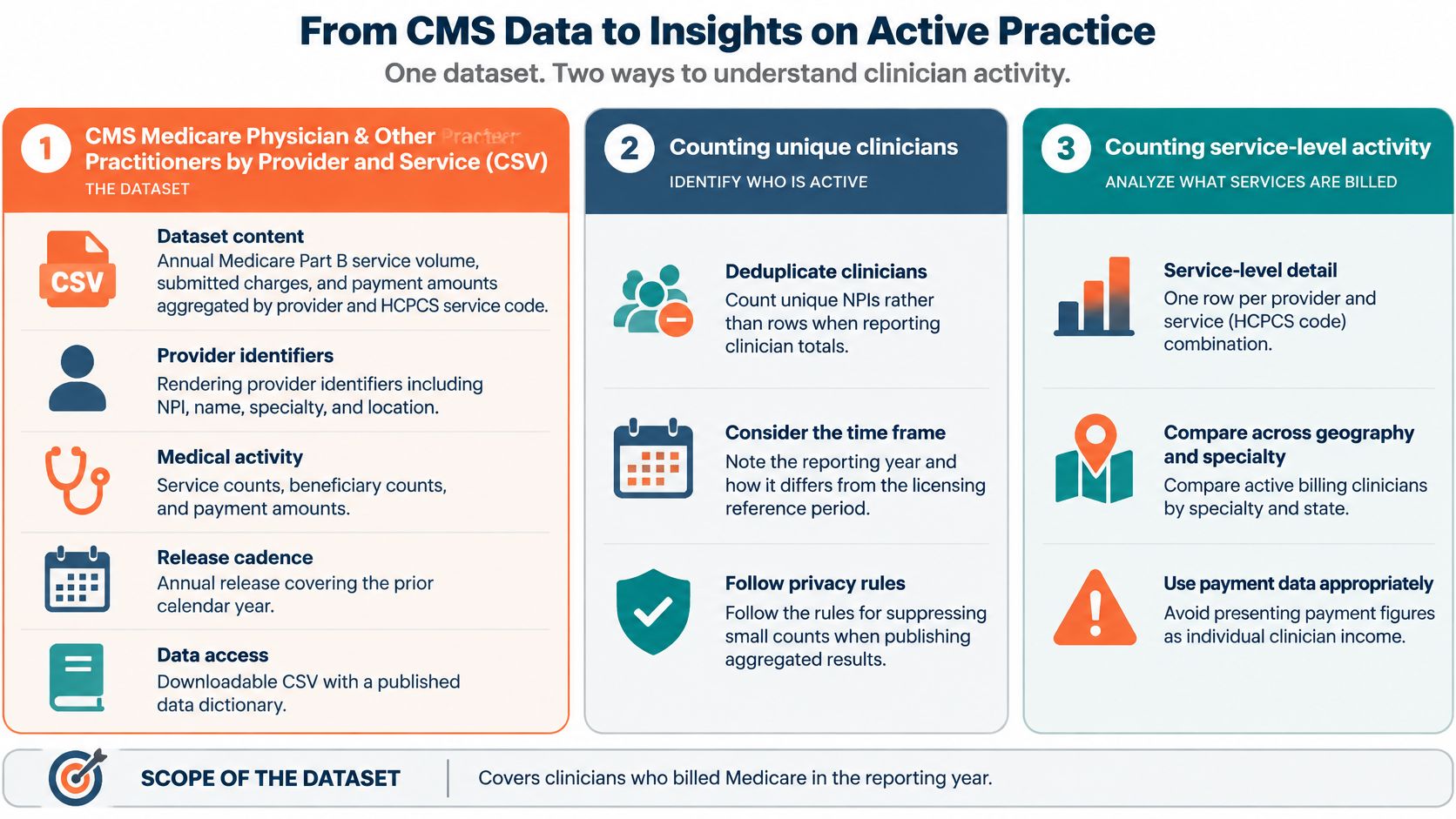
Don't present payment figures as individual clinician income. Payments reflect services billed under a number, practice arrangements, and payer rules. They don't equal take-home pay.
What billing proves: A clinician billed Medicare for a service in that year. It doesn't prove full-time practice, total patient volume, or licensure status today.
Comparing billing counts across health systems using organization identifiers can still be valuable. It shows where Medicare activity concentrates. Just label it as billing activity, not workforce size.
Public CSV sources for workforce counts at a glance
| Item | Geographic detail | Unit of count | Main limitation |
|---|---|---|---|
| NPPES NPI Registry Downloadable File | Practice and mailing locations; state-level coverage | NPI records for individuals and organizations | Registration does not confirm an active license; fields may be outdated |
| CMS Doctors and Clinicians National Downloadable File | Practice locations, including state and county aggregation | Clinician-practice location combinations | Covers Medicare-enrolled clinicians only; clinicians may appear at multiple locations |
| BLS Occupational Employment and Wage Statistics (OEWS) CSV | National, state, metropolitan, and nonmetropolitan areas | Estimated employment by occupation | Survey-based estimates; small-area data may be suppressed or unreliable |
| U.S. Census Bureau American Community Survey Tables (CSV) | State, county, and place | Population, employment, or occupation estimates | Sample-based estimates have margins of error, especially for small areas |
| County Business Patterns (CBP) CSV | County-level | Establishments, employment size bands, and payroll by industry | Does not identify individual employers or occupations; some data are suppressed |
| HRSA Area Health Resources File (AHRF) | County-level, with population and facility data | Health professionals by occupation | Source years and professional definitions may vary |
| NCES IPEDS Completions Data (CSV) | Institution-level, linkable to state and location | Degrees and certificates awarded by field and level | Completions do not indicate licensure or entry into professional practice |
| CMS Medicare Physician & Other Practitioners by Provider and Service (CSV) | Provider locations, including state-level comparisons | Provider-service combinations; unique NPIs for clinician counts | Covers only clinicians who billed Medicare during the reporting year |
Choosing the Right CSV Before You Count
Name the population first. Is your file measuring people who are registered, enrolled, billing, employed, graduating, or operating an establishment? If you can't answer that in one sentence, don't publish the total yet. Most workforce errors are definition errors wearing the clothes of arithmetic.
CSV itself won't protect you. The format became formally documented when the Internet Engineering Task Force published RFC 4180 on October 4, 2005, registering the MIME type text/csv and defining records, comma-delimited fields, optional headers, and double-quote escaping. That shared syntax helps files move between systems. It doesn't encode data types, units, provenance, or what "active" means in your field.
That gap is well documented. The University of Washington programming-languages research group notes that CSV files don't guarantee consistent column counts or data types, and the intended format may be unknowable without the generating code. The UK Information Commissioner's Office describes CSV as widely supported for data portability while also noting that it isn't standardized. Your documentation has to supply what the format leaves out.
So pair every CSV example you publish with a data dictionary, an encoding declaration, a missing-value policy, a source date, a row-grain statement, and a changelog. Keep identifiers such as ZIP codes, FIPS codes, and license numbers as text so leading zeros survive. Test the file in Excel, a database import, and a script, because delimiters, quoting, and locale formats fail without warning.
Scale also argues for discipline. The 2023–2024 National Survey on Drug Use and Health from SAMHSA included 181 individual CSV files containing statistical tables, while the UK Department for Education's 2024 Occupations in Demand release offered three downloadable datasets in CSV format. File count says nothing about comparability. Your notes have to.
Performance is rarely the binding constraint, though parser choice matters. In one benchmark, preprocessing a 10,000-row CSV took 0.173 seconds, while the full pipeline took far longer because embedding and ingestion dominated. A separate Ruby benchmark found SmarterCSV processed a 50,000-row fixture in 0.0869 seconds versus 1.6556 seconds for CSV.read. Benchmark your reader, then spend your effort on definitions.
We apply the same rule at ProfessionLens. Every licensing count is computed from a full public file, never a sample, and our method page lists rows read, kept, and dropped behind every figure. Each count page names its source file and count date, and every count is free to read and free to cite with a link to the page it came from.
Visit ProfessionLens to use count pages that name their source file and count date for physicians, dentists, pharmacists, real estate agents, insurance producers, engineers, and other licensed professions by state, county, and employer. Each research report links a CSV of the rows behind it, so you can inspect the underlying data, cite the figure with a link back, and check the method before you reuse the count.